App Development
Guides
Software Engineering
How we made Sisu’s lesson audio clear and reliable

Codse Tech
August 11, 2026
Sisu is our app for children learning their first words in English and Nepali. A child taps a picture and hears its name. That simple interaction depends on clear, consistent pronunciation.
Originally, Sisu asked the phone to read each word aloud. This is called text-to-speech (TTS). The result varied by phone: a word might sound clear on one device and incorrect on another. Some letter prompts produced phrases such as “capital A” when we wanted just the letter name.
We changed the app to play audio files that we generate and review before release. The files are bundled, which means they are included in the app download and work without an internet connection. This post explains that process and the playback problems we fixed along the way.
Why we generate audio before release
We considered three ways to provide lesson audio:
| Approach | Benefit | Tradeoff |
|---|---|---|
| Generate speech when a child taps | No need to include every clip in the download | Requires a network connection and adds a service request for each tap |
| Record every clip ourselves | Direct control over pronunciation and delivery | More recording work for each language, voice, and lesson |
| Generate, review, and bundle clips | Consistent audio that works offline | Larger app download and a review step before release |
We chose bundled clips because children need to hear a word promptly, including when the phone is offline. Phone-generated speech remains a fallback when a bundled clip is missing.
Keep the word separate from the recording instructions
The app needs a reliable way to find each clip. We use a lookup key containing the language, voice gender, and lesson text. For example, en|female|Apple identifies the English female-voice recording of “Apple.”
The instructions sent to the speech generator are stored separately. We can change pronunciation or delivery without changing how the app finds the clip. A warmer recording of “Mom” still belongs to the same lesson.
Our generation process has five steps:
- Read the lesson data and list the clips we need.
- Generate MP3 files and a manifest, a file that records which clip belongs to each lesson.
- Listen to the clips and replace incorrect recordings in Lesson Studio.
- Update the asset map, which tells the app where to find each audio file.
- Test playback in the app with
expo-audio, the audio library we use.
A complete set of files still needs a listening review
Our first full generation run produced roughly 1,730 clips: about 900 English clips and 830 Nepali clips across male and female voices. Every lesson could have a file and still sound wrong.
Spelling exposed this problem. Reading “Apple” and reading the letters “A, P, P, L, E” require different instructions. Some clips included unwanted words such as “capital.” We also wanted the American pronunciation “zee” for Z.
We separated the recording data into three parts:
- Lesson text: The word or letter the app displays and looks up, such as
Apple,आमा, orp. - Speech instructions: The text and pronunciation guidance sent to the generator.
- Surrounding context: Extra information intended to guide pronunciation or rhythm without becoming part of the recording.
For our letter clips, adding neighboring letters and a “small letter” hint improved the results. We still listened to each result. We used expressive instructions sparingly so that the spoken word remained easy to understand.
The same instructions can produce different results
We generated clips with ElevenLabs, either directly or through Replicate, a service that hosts AI models. During our testing, those two routes handled some instructions differently.
For example, [warm] Mom produced the intended direction through the direct ElevenLabs route. Through the Replicate setup we used, a clip spoke the word “warm” aloud. We changed our generation code to handle each service separately and checked the new recordings.
This was a result from our particular setup, not a guarantee about every version of either service. The practical lesson is to listen again whenever the model, service, or generation settings change.
Lesson Studio makes review easier
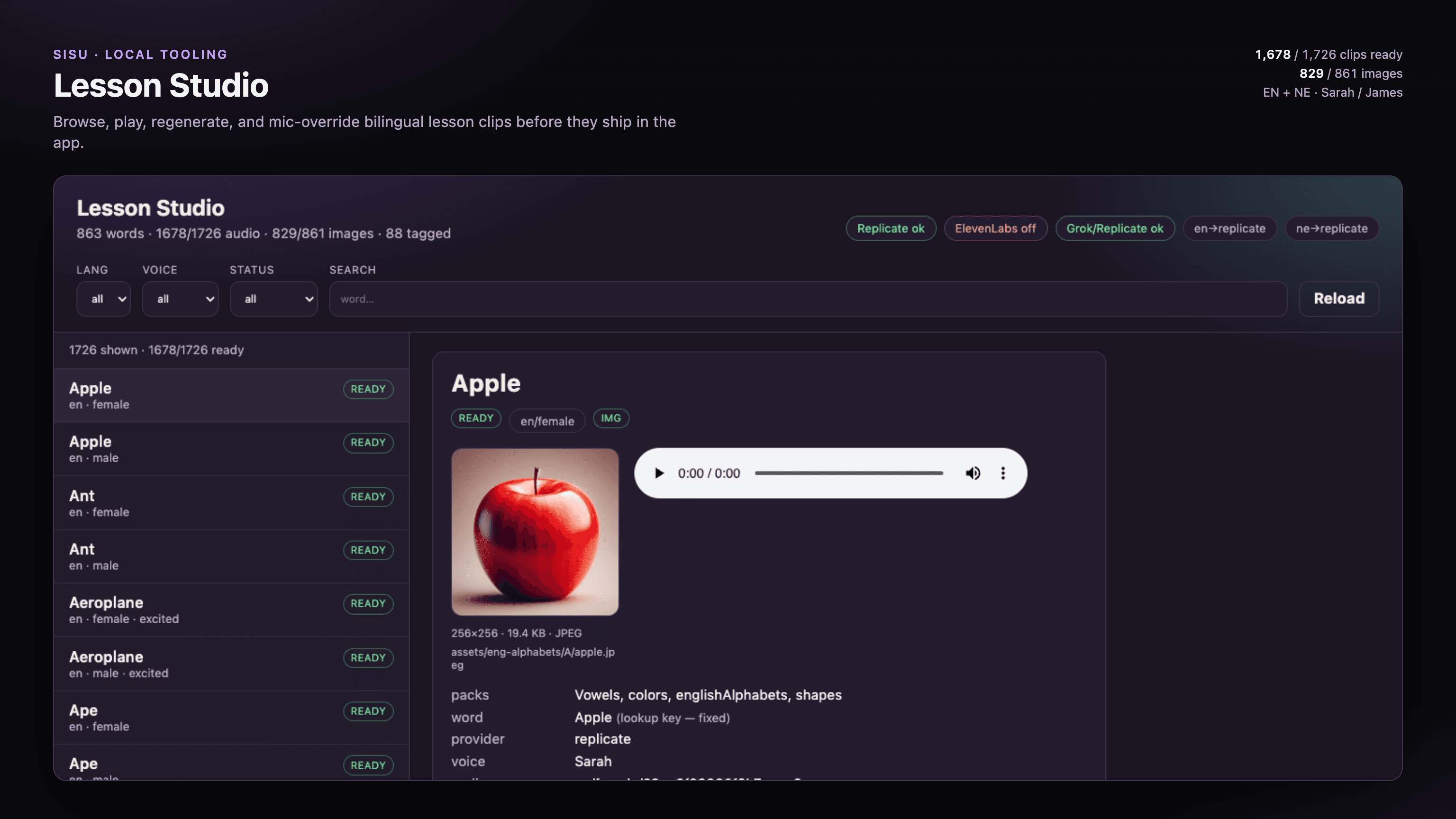
A script can check whether a file exists. A person needs to check whether the word sounds right. We built Lesson Studio, a review tool that runs on a developer’s computer, to make that work easier.
In Lesson Studio, a reviewer can:
- Filter clips by language, voice, or review status.
- Search for a word and play its recording.
- Edit the speech instructions and generate a replacement.
- Record a human voice when generated speech is unsuitable.
- Check the lesson image and replace it if needed.
- Update the app’s asset map after reviewing a batch.
A human recording uses the same lookup key as a generated clip. The manifest marks the recording as source: recorded, so reviewers can tell where it came from.
Lesson Studio writes to the app’s existing asset folders and manifest. Keeping those files together lets us review audio changes alongside the app changes that use them.
Remove files that the app no longer uses
Our audio filenames include a content hash, an identifier derived from the file’s content. A new recording gets a different filename, so an old recording can remain on disk after we replace it.
One cleanup removed about 25 MB of unused MP3 files. We now check the manifest after regeneration and remove recordings it no longer references. This keeps old takes out of the app download.
How playback works in a lesson
When a child taps a picture, Sisu finds the clip using its language, voice, and text key. The app loads the bundled file and plays it. Parents choose a male or female voice in their profile.
English lessons use English clips. Nepali alphabets, vowels, and numbers use Nepali clips. Spelling activities play a sequence: the whole word, its letters, then the whole word again.
We also added optional repeat playback and an autoplay countdown. These controls help children listen again without leaving the lesson.
Playback bugs we fixed after adding the clips
Good recordings do not guarantee good playback. Testing the complete app revealed several separate problems:
| Problem | What we changed |
|---|---|
| Spelling skipped letters or the final word | Created a fresh audio player for each clip and shared one playback queue between lessons and games |
| Letter names were unclear | Regenerated A–Z with slower, clearer delivery and removed the replaced files |
| Lesson music interrupted another app’s music | Changed the audio settings to allow both apps to play together |
| Music continued after leaving a lesson | Fixed cleanup so it always stopped the active background player |
We also encountered a startup crash in TestFlight, Apple’s app-testing service. In our affected iOS beta setup, loading the native audio module too early caused the crash. We delayed loading audio until first use and deferred other startup work. We also temporarily disabled a framework setting called React Native’s New Architecture in that setup.
That last change was a workaround for the version combination we were testing. It is not a general requirement for bundled audio. The broader lesson is to test launch, playback, and leaving a lesson in the release build users will receive.
Developer notes: the commands behind the process
These are scripts from Sisu’s repository, not built-in Expo commands. They share the same audio-generation code:
| Sisu command | Purpose |
|---|---|
pnpm run audio:speak-manifest | Prepare speech instructions from the lesson data |
pnpm run audio:generate | Generate MP3s, the manifest, and the asset map |
pnpm run audio:studio | Open the local review tool |
The generated map lives at src/generated/audio-assets.ts. It gives Metro, the tool that packages React Native code and assets, explicit references to the clips.
During the same release, switching to pnpm exposed a separate dependency-resolution problem in local iOS builds. Adjusting the installation layout fixed it. This reinforced why we test the packaged app after changes to either content or build tools.
What to check before releasing lesson audio
For each release, we check the complete listening experience:
- Confirm that each lesson and voice has a clip.
- Listen for pronunciation, extra spoken instructions, and inconsistent volume.
- Test word and spelling playback in order.
- Test offline playback and the fallback for a missing clip.
- Leave a lesson and confirm that its audio stops.
- Remove unused files and check the app’s download size.
The result is a more predictable experience: children hear the recordings we reviewed, and developers can replace a clip without changing the lesson that uses it.
Frequently asked questions
Why include audio in the download?+
Bundled clips work offline and avoid waiting for a speech service when a child taps a picture. The tradeoff is a larger app download.
Does Sisu still use the phone’s text-to-speech?+
Yes, as a fallback when a bundled recording is missing. Reviewed audio files handle normal lesson playback.
Can a person replace an AI-generated recording?+
Yes. Lesson Studio can record a replacement and keep it under the same lesson lookup key.
Can reviewers also update lesson images?+
Yes. Lesson Studio lets reviewers check an image, generate a replacement, or upload one to the app’s asset folders.
sisu
expo
expo-audio
elevenlabs
replicate
content studio
lesson audio
react native