Mobile Development
AI Integration
Engineering Guides
React Native + AI: How to Add LLM Features to Your Mobile App

Codse Tech
March 7, 2026
React Native + AI: How to Add LLM Features to Your Mobile App
Users expect AI features in mobile apps now. Search, summaries, assistants, smart forms, workflow automation — these aren't experiments anymore.
But adding a prompt box is the easy part. The hard part is shipping AI features that actually work on phones: spotty networks, background kills, app store review, and inference bills that creep up faster than you'd like.
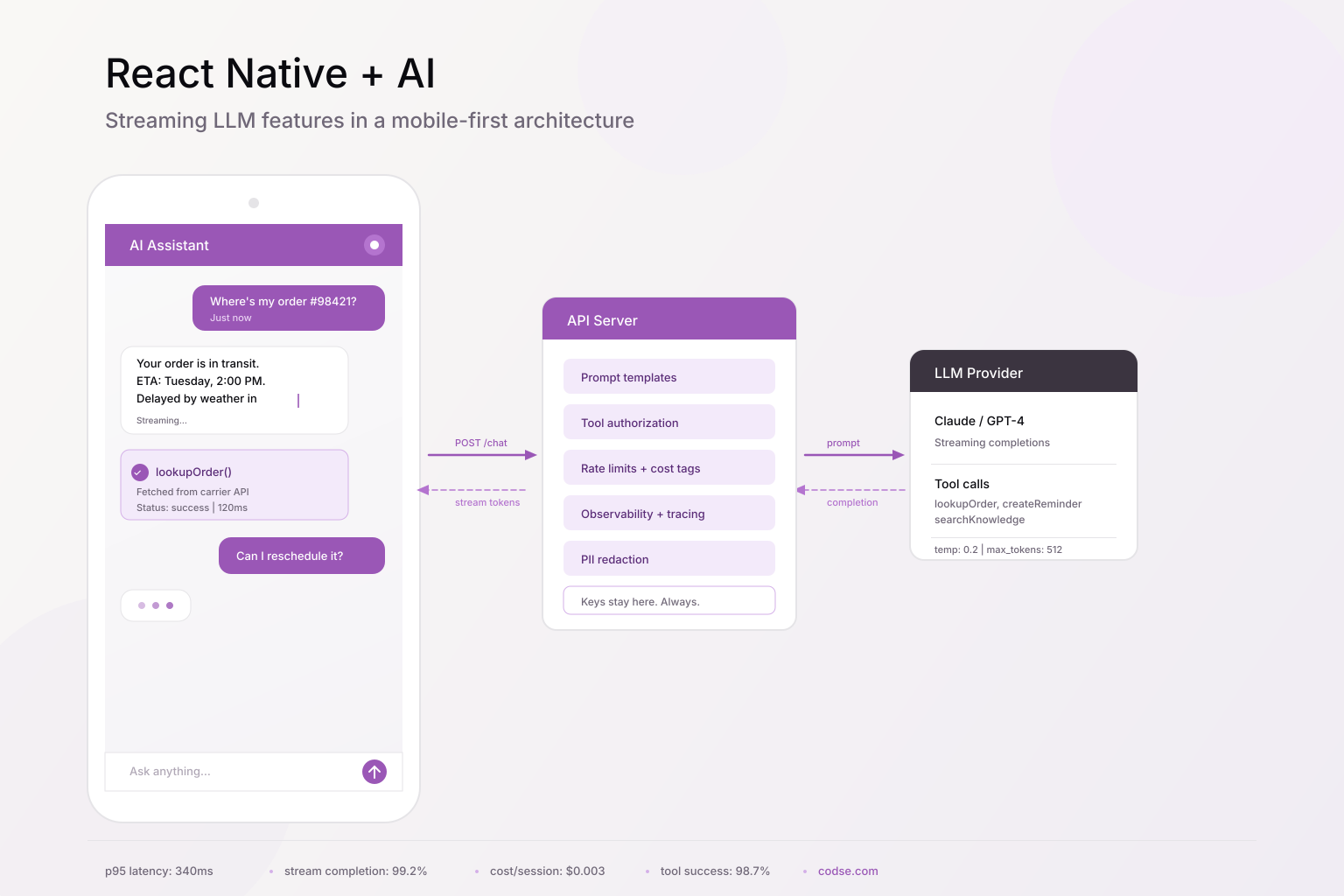
This guide walks through what we've learned building React Native AI integration for real products in 2026.
Why AI Mobile App Development Is Different from Web
Mobile AI UX breaks when teams port desktop assumptions straight onto a phone.
A few things that catch people off guard:
- Latency feels worse on mobile. Weak networks and device switching expose slow response pipelines instantly.
- Session continuity matters more. Users bounce between foreground and background constantly.
- Small screens punish long, unstructured model responses. You have less room to be verbose.
- Transport failures happen daily. Offline and retry handling isn't optional.
- Battery and data usage are product metrics. Heavy token usage tanks retention.
The upshot: you need strict response shaping, resilient transport, and compact UI patterns.
Architecture that works
For most teams, this is the setup that holds up:
- React Native app handles UI, local state, optimistic UX, and partial rendering.
- A backend API route handles model calls, prompt templates, tool authorization, and observability.
- External tools and data sources go through controlled services — never directly from the device.
React Native App -> API Gateway / Edge Route -> LLM Provider + Tool Layer -> Business Systems
This keeps API keys off devices, lets you enforce policy controls server-side, and means you can version prompts and run evals without pushing app updates.
If you're planning a broader AI rollout, this structure pairs well with AI integration services since feature velocity depends on reusable backend primitives.
Step 1: Build a streaming UX that feels native
Mobile users bail on "thinking..." spinners fast. Your app should render partial tokens as they arrive, keep scroll position stable, and handle stream failures without a dead end.
Message model
export type ChatRole = "user" | "assistant" | "tool";

export interface ChatMessage {
  id: string;
  role: ChatRole;
  content: string;
  status: "queued" | "streaming" | "done" | "error";
  createdAt: number;
}
Streaming hook (Expo/React Native)
import { useCallback, useState } from "react";

type SendInput = { sessionId: string; message: string };

export function useAiChat(apiBaseUrl: string) {
  const [messages, setMessages] = useState<ChatMessage[]>([]);
  const [isSending, setIsSending] = useState(false);

  const sendMessage = useCallback(async ({ sessionId, message }: SendInput) => {
    const userMsg: ChatMessage = {
      id: `u_${Date.now()}`,
      role: "user",
      content: message,
      status: "done",
      createdAt: Date.now(),
    };

    const assistantId = `a_${Date.now()}`;
    const assistantMsg: ChatMessage = {
      id: assistantId,
      role: "assistant",
      content: "",
      status: "streaming",
      createdAt: Date.now(),
    };

    setMessages((prev) => [...prev, userMsg, assistantMsg]);
    setIsSending(true);

    try {
      const res = await fetch(`${apiBaseUrl}/ai/chat/stream`, {
        method: "POST",
        headers: { "Content-Type": "application/json" },
        body: JSON.stringify({ sessionId, message }),
      });

      if (!res.ok || !res.body) throw new Error("stream_init_failed");

      const reader = res.body.getReader();
      const decoder = new TextDecoder();

      while (true) {
        const { done, value } = await reader.read();
        if (done) break;
        const chunk = decoder.decode(value, { stream: true });

        setMessages((prev) =>
          prev.map((m) =>
            m.id === assistantId
              ? { ...m, content: m.content + chunk, status: "streaming" }
              : m,
          ),
        );
      }

      setMessages((prev) =>
        prev.map((m) => (m.id === assistantId ? { ...m, status: "done" } : m)),
      );
    } catch {
      setMessages((prev) =>
        prev.map((m) =>
          m.id === assistantId
            ? {
                ...m,
                status: "error",
                content:
                  m.content ||
                  "Response interrupted. Retry when network is stable.",
              }
            : m,
        ),
      );
    } finally {
      setIsSending(false);
    }
  }, [apiBaseUrl]);

  return { messages, isSending, sendMessage };
}
A few things to get right:
- Render tokens incrementally, but debounce re-renders so you're not killing the battery.
- Persist in-progress text so it survives background transitions.
- When something fails, give users a way to recover. Don't just show a toast and move on.
Step 2: Keep model calls server-side
Mobile apps should never call model providers directly. A server route gives you security, cost control, and observability in one place.
Example API route (TypeScript)
import { NextRequest } from "next/server";
import { streamText } from "ai";
import { anthropic } from "@ai-sdk/anthropic";

export async function POST(req: NextRequest) {
  const { sessionId, message } = await req.json();

  // Validate auth/session outside this snippet.
  if (!sessionId || !message) {
    return new Response("Invalid payload", { status: 400 });
  }

  const prompt = [
    "You are a concise mobile assistant.",
    "Prefer short sections and bullet points.",
    "If uncertain, ask one clarifying question.",
  ].join(" ");

  const result = streamText({
    model: anthropic("claude-3-5-sonnet-latest"),
    system: prompt,
    prompt: message,
    temperature: 0.2,
  });

  return result.toTextStreamResponse();
}
In production, you'll also want:
- Rate limits by user/session/device
- Prompt and output tracing
- Cost attribution tags per feature
- Kill switches for when a provider is slow or a prompt goes sideways
Step 3: Handle tool calls with explicit UI states
Most useful AI features pull data from your own systems, not just the model. When a tool call happens, show it. Users should see what the assistant actually did, not just the final answer.
Tool result rendering contract
export interface ToolResultCard {
  toolName: "lookupOrder" | "createReminder" | "searchKnowledge";
  status: "running" | "success" | "failure";
  summary: string;
  data?: Record<string, unknown>;
}
Assistant response with tool output
{
  "assistantText": "Order 98421 is delayed by weather and should arrive Tuesday.",
  "toolCards": [
    {
      "toolName": "lookupOrder",
      "status": "success",
      "summary": "Fetched shipping status from carrier API."
    }
  ]
}
This builds trust because users can tell the difference between "the model said this" and "the model looked this up in your system." It also reduces hallucination risk since the verified data is right there on screen.
For consumer apps, these workflows also affect discoverability — engagement and retention signals feed distribution systems. That's one reason AI teams pair product integration with app store optimization services.
Step 4: Design for bad networks and background kills
Your AI feature will break on real phones without these:
- Retry envelopes: idempotency key + exponential backoff + capped attempts.
- Resume logic: reconnect and keep streaming when the app comes back to foreground.
- Offline queueing: capture what the user wanted and send it when connectivity returns.
- Response limits: truncate oversized outputs and offer an “expand” action.
- Fallback models: route to smaller models when latency spikes or budget is tight.
Skip any of these and things fall apart the moment someone walks into an elevator.
Step 5: Control token costs
Token waste is common on mobile because prompts often carry unnecessary conversation history.
What usually works:
- Summarize context every N turns and trim old messages.
- Cache stable outputs (FAQ answers, policy text, product descriptions).
- Route simple requests to cheaper models. Save the expensive ones for complex tasks.
- Constrain output format and length so the model doesn't ramble.
Track cost per assisted session. It's the metric that tells you whether your AI feature is sustainable or quietly eating your margins.
Security checklist
Minimum bar before you ship:
- API keys and provider credentials stay on the server. Period.
- Strict schema validation for all model and tool payloads.
- PII redaction in logs and analytics pipelines.
- Role-based authorization on every tool endpoint.
- Abuse protection for prompt injection and automated scraping.
- Output moderation for unsafe or policy-violating content.
If you're in a regulated domain (healthcare, finance), add audit trails and data residency controls. Those aren't optional.
What to track weekly
Performance and product outcomes, together:
- Median and p95 first-token latency
- Stream completion rate
- Fallback/retry frequency
- Tool call success rate
- Cost per AI session
- Downstream product metrics (retention, activation, conversion)
A feature can demo great and still fail in production if you're not watching these numbers.
A 2-week pilot plan
Here's a realistic sequence:
- Pick one high-frequency user workflow.
- Define a narrow response contract and tool scope.
- Build the streaming UX and server route.
- Add observability, rate limits, and policy filters.
- Launch to a small cohort behind a feature flag.
- Review latency, quality, and cost data.
- Expand scope only after you hit your targets.
Start narrow, prove it works, then widen. Resist the urge to boil the ocean on v1.
Mistakes we see teams make
- Shipping a generic chat box with no domain tools. Users don't want another ChatGPT wrapper.
- Calling the model directly from the app. Your API keys end up in someone's Charles Proxy session.
- Ignoring background/resume behavior. The stream breaks every time a user checks a notification.
- Dumping verbose model responses on a 375px screen.
- No cost guardrails. The bill surprises everyone at month-end.
Wrapping up
The model you pick matters less than you think. What makes or breaks a React Native AI feature is the stuff around it: how you stream, how you handle failures, how you show tool results, how you control costs.
Get those right and the AI actually feels like part of your app instead of a bolted-on chatbot.
If you want help with the architecture and production hardening side, we do this through our AI integration services.
AI integration services
Embed LLM features into your existing product with server-side orchestration, tool calling, and observability.
Explore serviceApp store optimization
Get your AI-powered app found and downloaded with data-driven ASO for iOS and Android.
Explore serviceFAQ
Can React Native stream LLM responses reliably?+
Yes. fetch streaming with incremental rendering works well if you add retry/resume logic and request timeouts. We've shipped this pattern on both iOS and Android without issues.
Should mobile apps call OpenAI or Anthropic APIs directly?+
No. Always proxy through your server. Otherwise your credentials are one reverse-engineering session away from leaking.
What's the best model for mobile AI?+
Depends on the task. We typically route simple requests to a fast, cheap model and reserve larger models for complex reasoning. There's no single right answer.
How long does it take to ship a production AI feature in React Native?+
A focused pilot can ship in two weeks if you keep the scope narrow and include observability from day one.
How do AI features affect app discoverability?+
Good AI features improve engagement and retention metrics, which feed app store ranking algorithms. Clear feature pages and structured docs help with web discoverability too.
React Native AI integration
AI mobile app development
LLM mobile apps
Expo AI
streaming UI
tool calling
mobile app architecture